
Hardware
The HP dl380 G5 with 1 raid5 array of 4*300GB SAS 10k and 1 raid5 array 3*500GB SATA disks, is getting choked, i didnt belive that adding SATA disk to the disk controller would implicate speed reduction to the extent of me noticing it, well i have noticed it. Note to self do NOT mix SAS and SATA disks on the same controller.
Intention is swapping all the disks to 600GB SAS 10k, after understanding for the first time the limitation of the 2TB vmfs store ( took 24 hours ) i had to rethink..
solution: 1 raid10 array 2*300GB and 1 raid5 array 4*600GB+1HotSpare, the bigger array came upto 1.45TB in size a little dissapointing when the goal was to run 3.3TB in total.
noticing that the battery of the array has given up.. hmmm did anyone say speed reduction..
have to hack the battery..
Software
Backing UP
backed up the ESXi host with the help from Aleks (NAKIVO)s post on spiceworks
Back up an ESXi host manually:
To ensure that the configuration of the target ESXi host is synchronized with persistent storage, run the following command:
vim-cmd hostsvc/firmware/sync_configTo back up ESXi configuration, run this command:
vim-cmd hostsvc/firmware/backup_configThe command will produce a link for downloading the configBundle.tgz archive.
Note that you have to replace the asterisk in the provided link with your IP/FQDN. Alternatively, access the backup file in the /scratch/downloads directory, where it is stored as configBundle-HostFQDN.tgz.
Get the UUID, build and version ( you have to restore to same ground level box )
Look in webgui for version and builnumber ( and get that ISO-image to make recover with )
for UUID run the command:
esxcfg-info -u
Restore/Recover
Recover ESXi configuration in ESXi command line
Before taking the first step, ensure that the ESXi version, build number, and UUID of the target host match the version, build number, and UUID of the ESXi configuration that needs to be recovered.
Then, connect to the target ESXi host via SSH and put the host into maintenance mode:
esxcli system maintenanceMode set –enable yesor
vim-cmd hostsvc/maintenance_mode_enterUse an SCP client to copy the archive with the ESXi configuration (configBundle-xxxx.tgz) to the target ESXi host directory.
Rename the configBundle-xxxx.tgz file to configBundle.tgz:
mv /tmp/configBundle-esxi6-7b.localdomain.tgz /tmp/configBundle.tgzRecover the ESXi configuration:
vim-cmd hostsvc/firmware/restore_config /tmp/configBundle.tgzThe ESXi host will restart automatically.
xit the maintenance mode:
esxcli system maintenanceMode set –enable noor
vim-cmd hostsvc/maintenance_mode_exitdone.. not quite…
VMware 6.5.0 U3
Realizing i could cram in 6.5.0 U3 – happy face -, did the VMware vanilla and not the HP custom.
Have to check howto add VIB support for the ancient p400 array controller ..
and now i cant restore since installing higher version, a good thing that this box has VERY simple configuration.
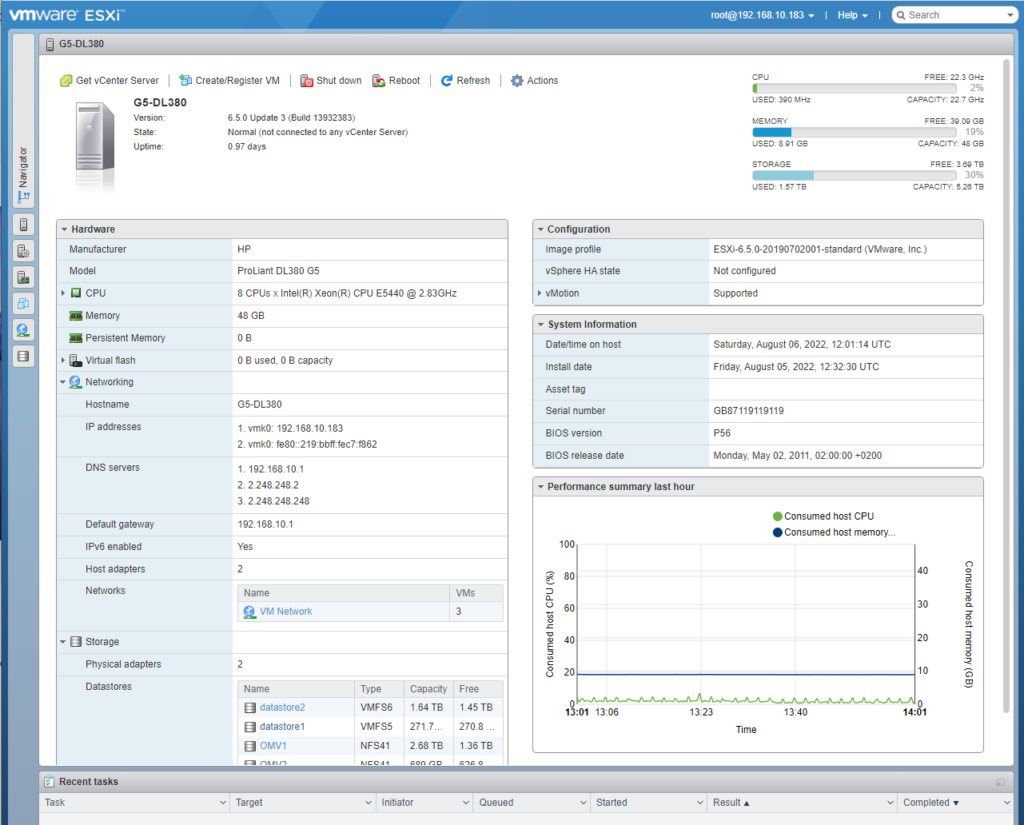
However… VMware has announced that the raid controller p400 is deprecated and unsupported from VMware ESXi 6.0 (2087970 ) https://kb.vmware.com/s/article/2087970 but works like a charm for me, ( well i cant see the separate disks in webgui, still have to check if there is a VIB add hack or something.. )